12 Marketing Tasks You Can Automate with AI (Ranked)
What marketing tasks can be automated by AI? See the 12 worth it for agencies, ranked by hours saved per client, plus which ones to keep human.
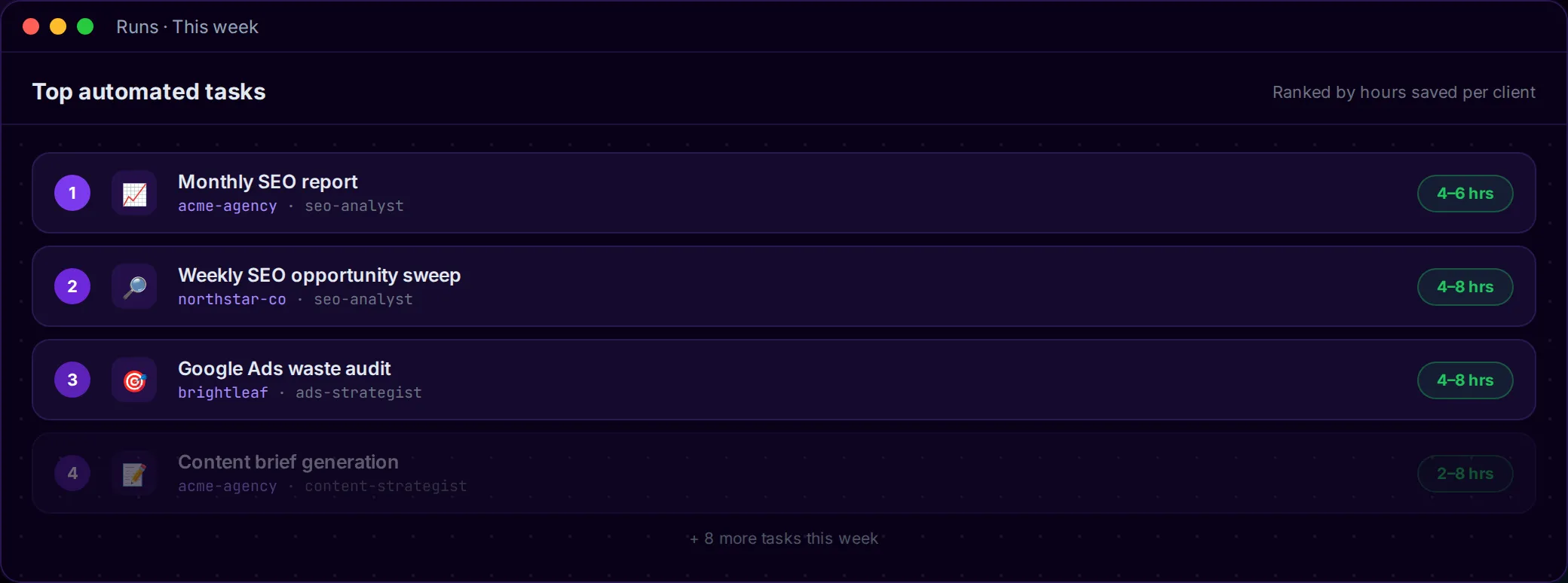
Most lists answering “what marketing tasks can be automated by AI” were written for a brand automating its own funnel. This one is for the agency running forty or two hundred client sites on margin, where an hour of senior time spent formatting a report is an hour that nobody ever billed for.
The ranking below sorts twelve tasks by delivery hours saved per client per month, then adjusts for how often each task recurs and how badly it can hurt a client when the automation slips. What lands near the top are the repetitive marketing tasks AI can do without judgment calls, because those are the ones eating your team’s week. Strategy, creative work, and the final quality bar stay with humans; that boundary gets named toward the end.
One rule applies to everything on the list. Each task produces a deliverable, then stops. Nothing touches a client site until a person hits approve. That single guardrail is what lets you run a whole roster of AI entities without lying awake at 3 a.m. wondering what shipped overnight.
What Marketing Tasks Can Be Automated by AI
Short answer: the marketing tasks to automate with AI are the recurring, data-heavy ones that produce a reviewable deliverable instead of publishing anything live. That covers monthly SEO reports, weekly opportunity sweeps, Google and Meta ad audits, content briefs, article drafts, technical and cannibalization audits, internal-linking suggestions, and review replies. Strategy, positioning, pricing, and the final quality bar stay with your team, behind an approval step before anything reaches a client site.
The ranking below shows which marketing tasks are worth automating first inside an agency, and why the order looks different from most brand-side lists.
How we ranked these
Three factors, weighted plainly:
- Hours saved per client per month. How much delivery time comes back once the entity handles the first pass.
- Frequency. Weekly tasks beat quarterly ones because they compound across every client on your book.
- Damage risk if it runs wrong. Diagnosis and draft work is safe. Anything that could publish a mistake on a live site drops until an approval gate closes the exposure.
High hours plus high frequency plus low risk floats up. Reporting and SEO sweeps lead for that reason, and the single highest raw time-saver on the whole list, article drafting, sits mid-pack rather than first. Ranking by risk instead of raw savings is what filters the best marketing tasks for AI automation out of the longer list of things an entity can technically do.

1. Monthly client SEO reports
Reporting is where agency margin quietly goes to die. It repeats every client, every month, and the last week of every cycle turns into a formatting marathon that consumes senior time you can’t rebill. The entity pulls the numbers on day one of the cycle, writes the plain-language summary, and drops a branded draft in your queue before a human opens a slide.
Time back per client per month: 4 to 6 hours. The report never sends until a human reads it, so the exposure is low. This is also the task that turns “no 40-page reports, no copy-paste to-do lists” from a marketing promise into an actual line on your team’s calendar. It was the most-repeated automation win across the marketer threads we studied, which is why it opens the list.
2. Weekly SEO opportunity sweeps
A senior SEO on a good morning can find one client’s striking-distance keywords, the quick wins parked at position 11, the CTR anomaly where a page slipped last week without anyone noticing. What no senior has is the hours to run that across a full book of clients, every week, without dropping something on the floor.
The entity runs the SEO opportunity sweep weekly across the whole roster and hands back every ranked opportunity in one queue. Marcus, our SEO director, described what changed for him plainly: the opportunities show up on their own, and his week finally has room for the strategy calls his job title implies. Call it 4 to 8 hours saved per client, recurring every week. Nothing publishes; the sweep only recommends.
3. Google Ads waste audits
This is where the reclaimed hours convert into actual dollars, which is why the paid ad audits pair sits this high. The entity flags wasted spend, negative-keyword bleed, learning-phase health, and drifted campaign settings before the client emails to ask why CPA jumped.
The proof point that sells this one is uncomfortable. A paid account can run eighteen days at real budget with zero conversions because a tracking listener was never installed, and a human auditor can miss the whole eighteen days. An entity checking every account weekly catches it on day one. Figure 4 to 8 hours back per account on a weekly or biweekly cycle. Nothing changes a bid without your say-so, and every dollar shows up in the audit trail.
4. Meta Ads creative-fatigue review
Meta creative decays. By the time a human notices the frequency climbing and the CTR dropping off, the account has already burned five days of budget serving tired ads to the same audience. That lag is common on Meta, and it costs real money that never comes back.
The entity watches fatigue signals across every Meta account and flags stale ones days earlier than a manual weekly review would catch them. It reads the metrics; the creative call stays with your team. Reclaim in the 4 to 8 hours range per account per week, and most agencies switch this one on alongside the Google Ads audit above.
5. Keyword cannibalization audits
Two of a client’s pages competing for the same term, splitting the ranking and pulling each other down. Every in-house SEO recognizes that pain, and almost nobody has the hours to hunt it manually across a full content cluster.
One agency owner described what popped out of a first run as “the cannibalization we’d been missing for six months.” That’s what this task looks like in practice: the entity maps the term overlap and shows you which pages are colliding, and a human still decides which one wins the term and which gets merged or redirected. It runs on a longer cadence than a weekly sweep, so budget 3 to 5 hours per client per deep dive. Since it only diagnoses, the risk is contained.
6. Content brief generation from real search demand
A brief built on guessing what people search almost never survives contact with the SERP. The entity assembles the brief from real questions instead: search demand data, community discussions, autocomplete. Your writer opens a doc grounded in what readers actually type rather than a hunch about what they might.
Savings scale with how much content each client produces, so anywhere from 2 to 8 hours per client per month depending on cadence. Risk stays low because the brief only becomes public once a human writes it into an article. Marcus watches this one closely: a brief his junior writer can trust cuts the rewrite tax on everything downstream.
7. Site indexing and technical audits
A full technical audit rolls together bulk index-status checks, canonical mismatches, pages stuck in “discovered, not indexed,” and the redirect chains nobody ever mapped. Any technical SEO would run this sweep weekly if the hours existed. Almost none do, because doing it by hand across forty sites is agony.
The entity runs the whole sweep in one pass and returns a prioritized fix plan rather than a raw dump of every issue. A practitioner in the SEO community has already hand-built a rough version of exactly this, and uses it to manage several times the client load he could handle before, which is a decent proxy for how real the demand is. Budget 2 to 4 hours per client on a monthly cycle. Scoped as diagnosis, the whole thing sits behind approval before any fix it drafts touches the live site.
8. Full-length article drafting in the client’s voice
Drafting long-form articles is one of the most cited AI marketing automation examples going, and it has the highest raw ceiling on this list. A single long article can cost a writer 4 to 16 hours, and an entity can draft, optimize, and stage it for review while your team spends that time on higher-value work. Ranked on pure hours saved, this task would be number one.
It sits mid-pack because it’s the most reputation-sensitive thing an agency can hand to a model, and the research on that is loud. Real practitioners say AI blog content “feels inauthentic and soulless” and that “clients keep flagging stuff.” Which means this task is only safe with a second layer above it: an editor entity trained on the specific client’s voice that reads every draft for AI smell before a human ever opens it. Nothing goes from model straight to client site; the human sign-off still closes the loop.
9. Internal linking suggestions
Internal linking shows up on every technical-SEO pain list and almost never actually gets scheduled. Fresh links pointing at the pages that need authority, surfaced across a client’s cluster instead of hunted for one URL at a time. The entity reads the site structure and proposes anchors. A human still places the links, because context and anchor phrasing deserve a pair of eyes.
Payoff is modest but real: 1 to 3 hours per client on a cluster-by-cluster basis, run when a cluster warrants a pass. Risk stays low since these are suggestions rather than live edits. Small task on its own, but it stacks cleanly on top of the content and audit work that’s already running.
10. Google Business Profile review replies
These are the small replies to Google reviews that have to go out steadily and sound like a person wrote them. Per instance, the work is barely anything. Multiplied across a book of local clients, it adds up to real hours and the kind of quiet mental load that never quite leaves your ops lead’s head.
The entity drafts each reply in the client’s tone and drops it in your queue for a look. Nothing posts on its own; a human approves before anything appears under the client’s name. Figure 1 to 3 hours per client per month. Priya, our delivery lead, likes this one for how cleanly the approval flows out of the queue.
11. Local heat-map ranking checks
Grid-based local rank tracking for multi-location clients, run on schedule instead of by hand. It’s the kind of task a local-SEO account manager would set up in a heartbeat if the hours weren’t already claimed by everything else on the roster.
The reason this one ranks near the bottom is honest: it only applies to a subset of clients, so its payoff caps well below tasks that touch every account. Budget 2 to 4 hours per month for the clients it fits. Read-only, so the risk is nil. Turn it on when local work is a real slice of your book, and skip it when it isn’t.
12. Cross-client dashboards
This one isn’t a task so much as the multiplier over the other eleven. A single dashboard view across the whole roster, so a partner or ops lead sees every client’s rankings, spend, and pending approvals without opening forty browser tabs.
It has no standalone hours-saved number because its value is making the other eleven legible at a glance. This is the payoff hiding behind the phrase “run ten clients like one.” Read-only, effectively zero risk, and the thing that turns a pile of running entities into a roster a single owner can actually keep in their head.

The tasks you should not automate
The list stops where judgment starts. A few things belong to people, and pretending otherwise is how agencies get burned in ways that don’t show up until renewal.
Strategy stays with you. The entity can surface every striking-distance keyword on a client’s account, but deciding which one actually serves the client’s Q3 goal is a call a human makes. Client relationships stay off the automation list too; trust gets built on a call and never on a dashboard. Creative direction and brand positioning belong with your team because taste doesn’t come out of a model, and pricing decisions belong with people who understand the room the deal is being closed in. The final quality bar is always yours, and that’s precisely what the approval gate exists to protect.
Hand the repeatable work to the machines and keep the work that clients hired a human to do in the first place.
The pattern that makes all 12 safe
Look back at the twelve and the same shape repeats across every one of these AI-automated marketing workflows. The task produces a deliverable, then stops moving. The report drafts itself into your queue and waits for a read. An audit flags what it found and holds there; a reply gets drafted and pauses in the same queue. Nothing publishes, sends an email, or edits a live client site until a person opens the deliverable and clicks approve.
That’s the practical line separating AI that advises you from AI that ships something without your knowledge. The same approval workflow runs underneath every task on the list, and per-client credentials stay isolated so nothing leaks between accounts. Twelve tasks come off your team’s plate, and none of them can put something under your client’s name that you didn’t look at first.
Try one of these for your agency
Pick the task sitting at the top of the list. Point a roster-wide SEO sweep at your clients and watch it run end to end, from the first signal to a drafted fix sitting in your queue and waiting for a human. It’s the fastest way to automate agency marketing tasks without handing over your quality bar in the process.
The entity does the work, logs the receipts in the client changelog, and waits at the approval gate. Run that on ten clients once and the roster starts feeling smaller than it is. See how it works, or request a proposal when you’re ready to run the roster math. If you want the full rollout playbook first, start with the guide to automating marketing tasks with AI. Or see the full AI marketing automation platform these tasks run on.
Frequently asked questions
What marketing tasks can be automated by AI?
Recurring delivery work that produces a reviewable draft. AI can handle monthly client reports, weekly SEO opportunity sweeps, keyword cannibalization audits, content briefs, article drafts, Google and Meta ad audits, technical audits, internal linking, and review replies. Strategy, creative direction, pricing, and the final quality check stay with humans behind an approval gate.
What tasks can be automated by AI?
Anything repetitive and data-heavy that produces a reviewable draft rather than publishing a live change. Inside marketing that means reporting, SEO audits, ad-waste checks, keyword research, content briefs, and drafted responses to reviews or leads. AI runs the first pass at scale, and a person approves the result before it reaches a client.
How can AI be used to automate marketing?
Point an AI entity at a defined, recurring task, give it the client’s real data, and have it produce a deliverable that waits in a queue. The entity pulls the numbers, runs the audit, drafts the report or article, and stops. A human reviews and approves, which keeps both speed and judgment in the loop.
What can you use AI for in marketing?
Use AI for the repeatable delivery layer: monthly client reports, SEO opportunity sweeps, cannibalization and technical audits, ad-spend waste reviews, creative-fatigue checks, content briefs from real search demand, article drafts in the client’s voice, internal linking, and review replies. Keep strategy, positioning, pricing, and client relationships firmly with people.
Will AI content sound like a bot?
Only if you skip the editor layer. A raw model draft often reads soulless, and clients notice fast. The fix is a second entity, modeled on the specific client’s voice, that scrubs every draft for AI smell before a human opens it. Drafts still stop at approval, so nothing bot-sounding reaches the client.
What if the AI publishes something wrong on a client site?
It can’t, because nothing publishes on its own. Every task on this list produces a draft or a flag and then waits in your queue for a human to open it. You approve or you don’t; either way, the live site never sees anything that a person hasn’t reviewed first.
Will automating a big roster get expensive?
Not the way you’d expect. The heavy data work runs in code, which is far cheaper than a browser-based agent burning tokens on every step. The AI compute also runs on your own provider account at cost, with no markup added. A weekly sweep across sixty clients costs a fraction of what agent-style tools spend on one.