How Orchestror Builds a Monthly Client Report — Automated Client Reporting Without the Copy-Paste Week
Automated client reporting that pulls SEO, ads and GBP into one branded report — matched to your work log, held for your approval before it reaches the client.
Every agency has a week it dreads. It’s the last one of the month, when reporting comes due and someone spends three days screenshotting four dashboards into a deck the client skims for ninety seconds. This post is about getting that week back. It walks through automated client reporting the way Orchestror does it: you ask once in plain English, and you get a single branded report covering SEO, paid and local, in the client’s own colors. It waits as a draft for you to read before it reaches their inbox.
This is part three of Talking to your Ghost team. Part two followed the content orchestrator turning one topic into a draft. This one covers the deliverable that shows a client the retainer was worth paying for.
The ask — what you actually type
You open this conversation when the calendar has you cornered. It might be month-end across a full roster, with every client expecting the same email on the same Friday. It might be a QBR where “what did you actually do for us” needs a clear, confident answer, or a renewal where the story matters as much as the numbers. Reporting takes an hour or two per client, every month, and that adds up fast across a roster.
So you open a chat with the client-reporter entity and type what you’d hand a junior analyst:
“Build this month’s report for [client], covering SEO, ads and GBP, and make it client-ready.”
You don’t tour the dashboards, merge files by hand, or fight a template into the client’s brand. You write one sentence.
What comes back
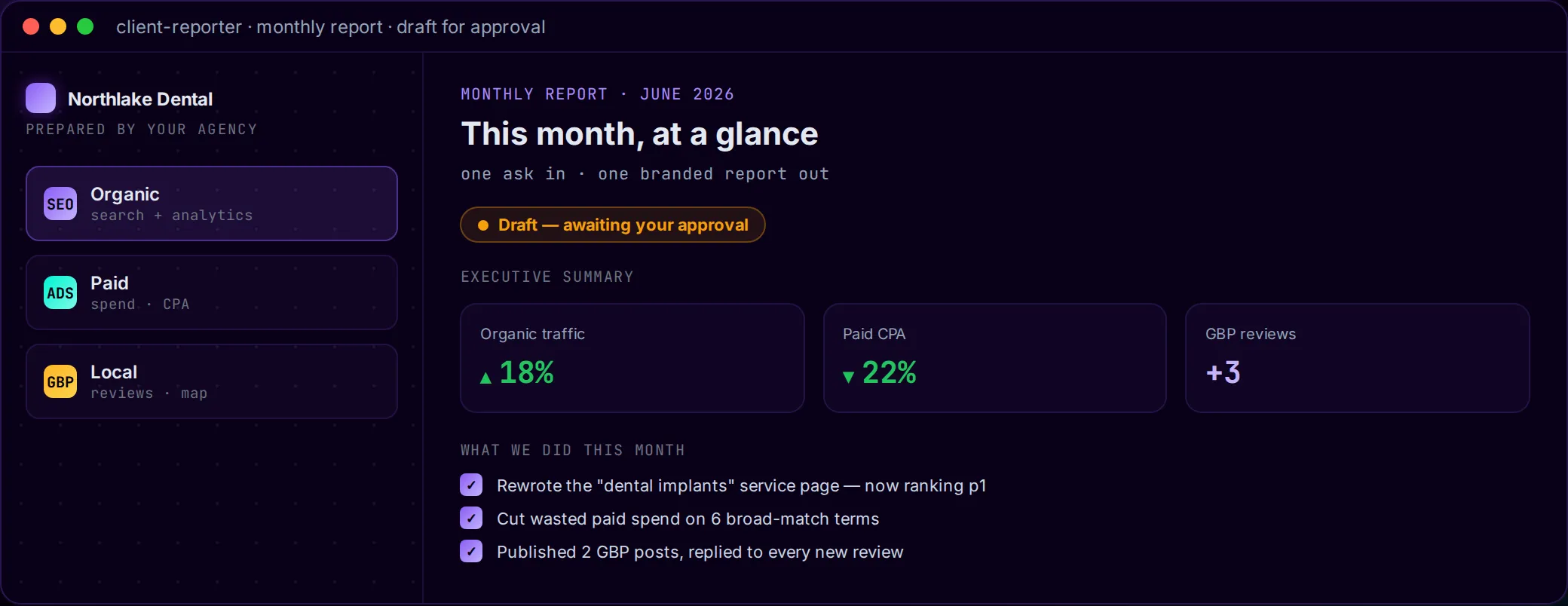
You get a single branded HTML report in the client’s logo and colors rather than yours. It’s laid out the way clients read: a plain-language executive summary at the top, with the detail underneath for anyone who wants it.
| This month at a glance | |
|---|---|
| Organic traffic | ↑ 18% month over month |
| Paid CPA | ↓ 22% — same spend, more conversions |
| Google Business Profile | +3 reviews, 2 posts published |
| What we did | 6 line items, pulled from the work log |
| Delivery | Branded HTML — optionally emailed to the client |
These figures are an example. Your own report uses your client’s actual month. Under the summary are three sections you can expand: SEO (organic traffic and rankings), Paid (spend and conversions) and Local (reviews, posts, map visibility). A client can read any of them on its own or skip them, since the summary covers the essentials. Alongside the numbers there’s a “what we did this month” list of the concrete work, which is often the part clients care about most. The report comes to you first as a draft, so nothing is sent automatically. It carries the client’s brand instead of a generic template, so it reads like it came from your agency.
Behind the conversation — one orchestrator, three channel reads
You talk to one entity. Behind the chat, client-reporter acts like a producer. It calls three channel specialists at the same time, lets each one put together its part, and combines the results into one deliverable.
- search-analyst pulls the month’s organic results from search and analytics data: traffic direction, ranking changes, and the specific wins worth calling out.
- ads-strategist summarizes paid performance across the ad accounts: spend, conversions, and where cost per acquisition moved and why.
- gbp-manager covers the local side for businesses that depend on the map: new reviews, posts published, and profile visibility over the month.
- client-reporter (the orchestrator itself) reads the site’s work log for the month, so the report says what was done as well as what changed, then combines the three channels into one branded HTML report.
Each specialist uses its own tools: an analytics connection for organic, the ad-account data you connect or export for paid, a business-profile connection for local, and the work log the platform keeps all month. You don’t have to touch any of them. The three channels are read in parallel and the report is built from all of them.
How the report gets richer
Three channel summaries are just three tabs until something connects them. A report a client trusts puts two things side by side that most tools keep apart: the numbers (what changed) and the work log (what you did about it).
- Results get credited to the work behind them. When a ranking goes up, the report ties it to the page that earned it, because the work log shows the page you rebuilt three weeks ago. “Organic up 18%” becomes “organic up 18%, led by the service page we rewrote on the 9th.”
- The story comes from real work. You don’t have to rebuild the “what we did” section from memory on a Thursday night. It comes straight from the log of actions taken on the account, the same habit of showing the receipts you saw in how the SEO side runs across a full roster.
- You approve it first. The report arrives as a draft you review before any number reaches the client. You can add context to the one figure that needs it, write the line only you can write, and then send it. Most AI tools advise. We execute, and then we stop and wait for your call.
- Each client is kept separate. Every account’s data, branding and credentials are walled off, so one client’s numbers, logo or keys never end up in another’s report, even when you’re producing twenty on the same morning.
When to reach for it
Use it at month-end across all your clients, for QBRs where the story has to land in the room, and for retainer check-ins where “here’s the month, in your colors” beats a spreadsheet. Reporting is one of the clearest wins on the list of marketing tasks worth automating, because the work behind it is real but putting it together never needed a person.
Prettier charts are a side benefit. The real change is that the same team can handle a much bigger reporting load, with every client’s report built on the same day to the same standard. Without it, reporting is a week of copy-paste that only scales by wearing people out. Your roster grows, and your analysts can stop rebuilding decks and spend their time on what clients pay for: what the numbers mean and what to do next.
Try it at your next month-end. Open a chat with your client-reporter entity and paste the sentence from the top: “Build this month’s report for [client], covering SEO, ads and GBP, and make it client-ready.” You’ll have a branded draft, backed by the work log, to review well before Friday, and nothing is sent until you say so.
Next in the series: the ads-strategist conversation, where Orchestror audits a client’s ad accounts and shows you where the budget is leaking.