How Orchestror Runs an AI Content Writing Pipeline: One Topic In, a Draft Out
An AI content writing pipeline that turns one topic into a research-backed, brand-voice draft, SEO-optimized, humanized and left in WordPress for approval.
Every content director knows the gap. You have a validated topic and a keyword you trust, maybe a calendar with twenty more queued behind it, and no hours left to write any of them. So the topic sits. This post walks through another option: an ai content writing pipeline that takes one plain-English topic and hands back a finished, on-brand, SEO-ready draft. It waits in WordPress until you approve it, and nothing goes live before that.
This is part two of Talking to your Ghost team. Part one opened up the site-audit entity. This one is a little meta: the content pipeline explaining how it works, in a post it wrote about itself.
The ask: what you actually type
You open this conversation on the days the backlog is winning. Maybe there’s a calendar with twenty briefs and a client who expects a post every week, or a topic you researched last month and still haven’t written. You start a chat with the content-pipeline entity and type what you’d send a writer on Slack:
“Write and publish a blog post on [topic] for [client], in their voice, SEO-ready, and leave it as a draft for me.”
There’s no template to pick and no form to fill in first. You write one sentence, the way you’d say it out loud.
What comes back
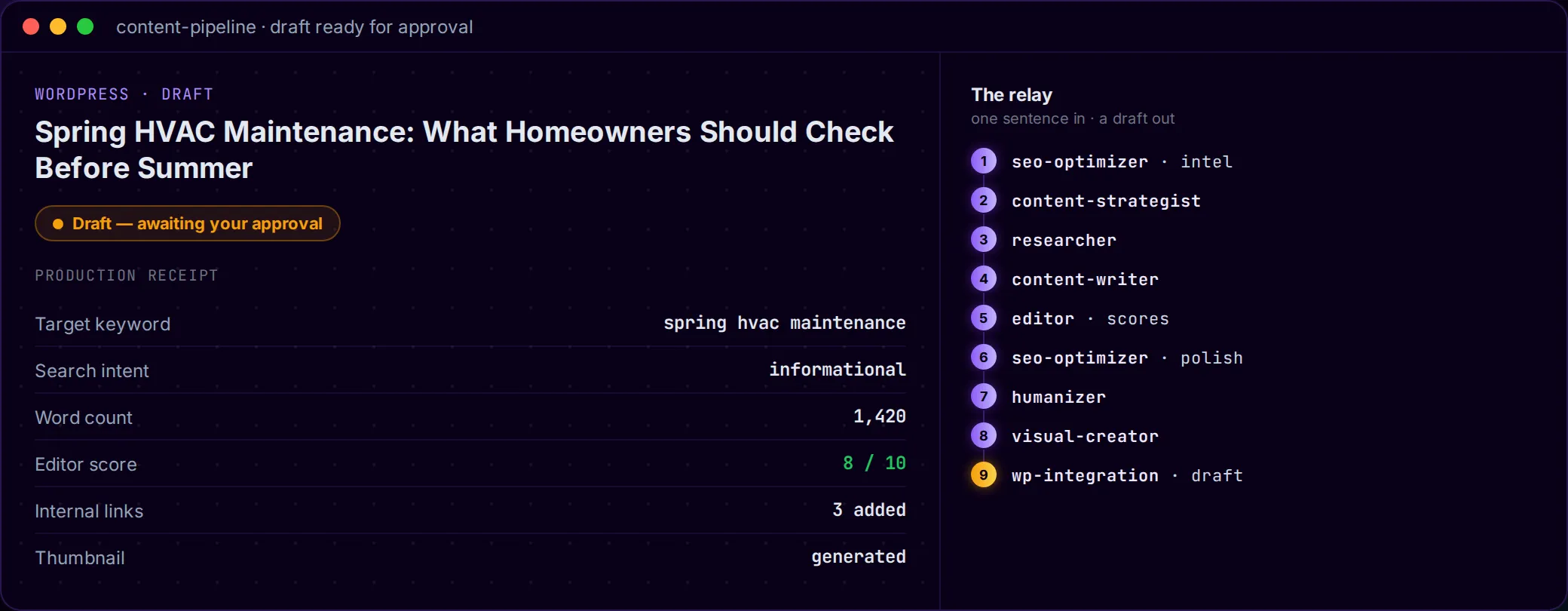
You get a finished draft, already saved in the client’s WordPress as a draft, along with a short production receipt so you know what you’re approving before you open it:
| Production receipt | |
|---|---|
| Target keyword | your topic’s best-fit term (informational intent) |
| Word count | 1,420 words |
| Editor quality score | 8 / 10, cleared on first revision |
| Internal links added | 3, to live pages on the client’s site |
| Thumbnail | on-brand UI mockup, generated |
| Status | Draft, awaiting your approval |
These numbers are an example. Your own run works from your topic and your client’s pages, and it earns its own score. The receipt is there so you can see at a glance that the piece has been researched, written, edited, optimized and illustrated. What’s left for you is the decision only you should make: whether it ships.
Behind the conversation: the content pipeline’s relay
You talk to one entity. Behind the chat, it runs a relay where each specialist does its part and passes the work to the next. It’s the longest linear flow in the roster, and each stage has a job:
- seo-optimizer (pre-writing) finds the keyword worth targeting and the search intent behind it, before anyone writes a word.
- content-strategist turns that research into a brief with the angle, the outline, and the questions the page has to answer to earn the ranking.
- researcher gathers the facts, stats and sources, so the draft is built on evidence.
- content-writer writes the full piece in the client’s brand voice rather than a generic house style.
- editor scores the draft against the brief. If it falls short, the draft goes back for a rewrite, up to two rounds.
- seo-optimizer (post-writing) tightens the title, meta description, keyword placement and internal links on the finished draft.
- humanizer removes the habits that make text read as machine-written, and leaves every keyword and link where it is.
- visual-creator makes the thumbnail as an on-brand UI mockup, plus any chart or infographic the piece needs.
- wp-integration saves the finished article in the client’s WordPress as a draft.
Underneath, each specialist uses its own tools: a search-data provider for keywords, a crawler and a SERP lookup for research, a WordPress connection for the upload. You don’t have to touch any of them. Nine specialists handle the work, and you wrote one sentence.
How the answer gets richer
A relay only works when each stage builds on the one before it, and that’s how this one is designed:
- Research shapes the brief. The strategist starts from a keyword and an intent the pre-writing pass already confirmed, so the angle isn’t a guess.
- Sources ground the draft. The writer works from sources the researcher already pulled and checked, so the statistics aren’t invented.
- The editor raises the floor. A draft that misses the brief goes back to the writer with specific notes. After two rounds of that, a weak first pass usually holds up.
- Two final passes on the same file. The post-writing SEO pass and the humanizer edit the same document, in that order. SEO sets the keywords and links, and the humanizer smooths the prose around them without moving anything the optimizer placed.
Then comes the most important step: it stops. The pipeline doesn’t publish. It saves the piece as a draft and hands it back to you, and nothing reaches a client’s live site until you’ve read it and said yes. That approval step is deliberate. Each run is also kept separate per client, so one brand’s voice, keys and content never mix with another’s. Most AI tools advise. We execute, and then we wait for your call.
When to reach for it
Use it for content backlogs that keep growing, or for weekly-post retainers you’re still writing by hand, which is exactly where automated content creation for agencies earns its keep. It also fits a topic you’ve already validated and want shipped, like the twelve in this list of AI-automatable marketing tasks. Writing faster is a side effect. The real change is that the same team can carry a much bigger content load, with ten clients’ calendars moving at once, each in its own voice, without adding anyone to the payroll. Your roster grows, and your writers spend less time on first drafts and more on the two places their judgment matters most: the brief and the final approval.
Try it on your next brief. Open a chat with your content-pipeline entity and paste the sentence from the top: “Write and publish a blog post on [topic] for [client], in their voice, SEO-ready, and leave it as a draft for me.” You’ll have a researched, edited, optimized draft to review before your coffee gets cold, and nothing publishes until you say so.
Next in the series: the client-reporter conversation, where Orchestror pulls a month of cross-channel work into one branded report you can send without building a slide.