Is Claude in Chrome Safe for Agencies? How Orchestror Governs Every Action
Claude in Chrome security for agencies: see how Orchestror checks every browser action before it runs, blocks off-limits sites, and keeps a human in the loop.
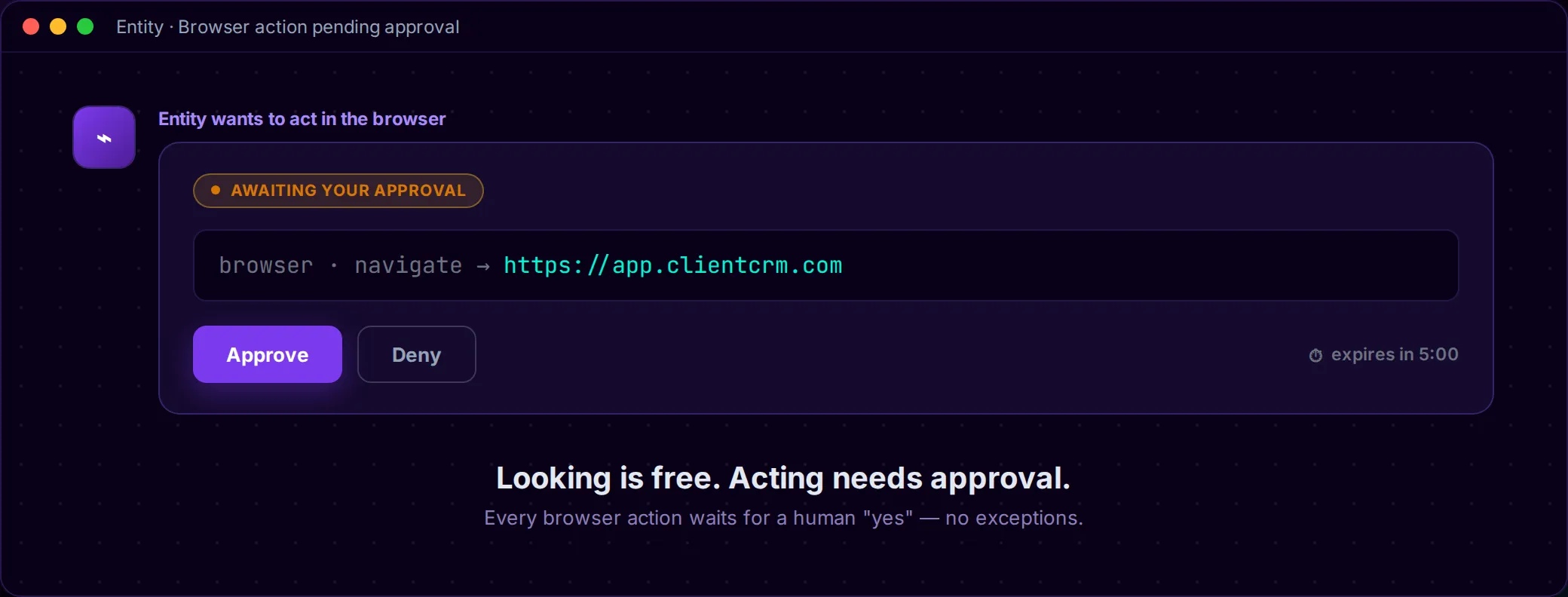
Picture an AI opening tabs and typing inside a browser you’ve pointed at a client’s logged-in accounts. It can read the CRM, click through an admin panel, submit a form. That’s the promise of a browser agent, and it’s also the fear. One wrong move in a client’s account ends with a phone call you really don’t want to make. So the Claude in Chrome security question agencies actually need answered is a simple one: what stops the AI when it misbehaves?
The principle that makes it workable: looking is free, acting needs approval. An entity can read anything on the page, but it can’t do anything until a human says yes. Most AI tools advise. Orchestror executes, under a control layer that checks every action before it happens.
Below, we go through the real risks of an AI browser agent one at a time and match each one to the control that handles it. No “trust us,” just the mechanics.
What Claude in Chrome actually does — and the real security question for agencies
Claude in Chrome is Anthropic’s browser extension: a side-panel agent that can see the active tab, click buttons, and fill forms on your behalf. Anthropic called it Claude for Chrome at its research-preview launch in August 2025 and Claude in Chrome once it reached general availability on paid Claude plans. Same extension, newer name.
Inside Orchestror, an entity uses that extension to run real browser automation from the chat: open a page, read it, take a screenshot, click, type, fill a form. Orchestror adds the control layer on top. That layer decides who can turn the browser on, what the entity may do without asking, what always needs a human “yes,” and which sites are off-limits no matter what.
If the idea of that running loose in a client account makes you uneasy, good. You’re right to be uneasy, and the rest of this post starts from there.
The real risk: a browser agent in a client’s account
The honest problem with any AI browser agent is prompt injection: a hidden instruction planted in a web page or email that hijacks the agent into doing something you never asked for. Competitors didn’t dream this up to scare you. It comes straight from Anthropic’s own testing.
At the August 2025 launch, Anthropic’s internal red-team testing found a 23.6% attack-success rate without mitigations, falling to 11.2% with safeguards in autonomous mode. Those are Anthropic’s numbers from its own internal tests, not an independent audit.
Newer models didn’t make the risk go away, either. By the general-availability announcement, Anthropic had retired its earlier test (attackers had saturated it) and ran a harder evaluation with professional red-teamers — which still found a 16.7% success rate against one of the tested models, even with the latest probes applied. The figures don’t line up across Anthropic’s tests because the methodology kept getting tougher. Our read is that, by the vendor’s own measurement, a browser agent’s attack surface is real and it’s sticking around. If someone quotes you only the lowest number, be suspicious. That includes us.
Anthropic doesn’t claim the problem is solved. Its research says plainly that “no browser agent is immune to prompt injection” and that even a 1% success rate “still represents meaningful risk.” Its safety guidance is blunter: “the risk is not zero.” Anthropic treats browser safety as probabilistic defense-in-depth, and calls permissions the “first line of defense,” not an airtight wall.
This goes beyond arithmetic, too. Zenity Labs documented a lab proof-of-concept in which a hidden instruction buried in an email (invisible white-on-white text) walked the agent into executing attacker-controlled JavaScript from a typosquatted domain. It was a lab PoC, and nobody has confirmed a breach like it in the wild. Still, it takes the attack out of the hypothetical column.
Why “ask the AI to behave” isn’t a control
Think about what that adds up to. If a hidden instruction on a page can push the agent off-script 10% of the time, or 16%, or whatever the real number turns out to be, then asking the AI nicely to behave doesn’t count as a control. The filters are probabilistic. They’re good and getting better, but they’ll never be absolute, and you can’t put the thing that can be fooled in charge of policing itself.
So the control has to live below the AI, enforced by the platform. An instruction hidden in a web page can’t switch off an approval or unblock a site, because those rules aren’t the AI’s to change. That’s the difference between a warning and a governance layer, and it’s where Orchestror’s control model starts.
Looking is free, acting needs approval
Here’s the core mechanic. Orchestror sorts everything the entity can do into two buckets.
Free — no approval needed (reading only): list tabs, open a blank tab, read page text and structure, find elements, read console and network logs, take screenshots, scroll, zoom, and hover.
Always asks first, one action at a time (acting): going to a URL, clicking, typing, pressing keys, filling forms, running page scripts, uploading files, and multi-step action batches.

Most of the thinking behind the product lives in that split. Reading changes nothing, so an entity can look at as much as it needs and report back to you without getting in your way. The moment it wants to touch something, the platform stops and waits for you.
The risks, and the control for each
Search “is Claude in Chrome safe” and the other results name the risks and stop there, which leaves you holding a list of reasons to be nervous. Here’s the same list with the control that handles each one.
Risk: the agent acts before you can stop it → Approval card for every action
Before any acting-type action happens, a card shows up in the chat saying exactly what the entity wants to do and where: browser · navigate → https://…, left_click, type: …. You get two buttons, Approve and Deny, and the card expires after five minutes. Nothing moves until you tap Approve. Since the card names the exact action and target, you’re signing off on something specific instead of answering a vague “is this okay?”

Risk: one careless “allow all” and it’s loose → No “always allow” for the browser
Most tools let you approve once and coast for the rest of the conversation. Browser actions don’t work that way. Even if an approve-for-the-session option gets sent, Orchestror counts it as one approval, so every click is a fresh decision. You won’t find a bulk “yes” that quietly hands the agent the keys, and that’s the shortcut that tends to cause trouble with other agents.
Risk: it wanders into inboxes, banks, or admin panels → Off-limits sites, blocked before the browser moves
Some destinations should never be on the table. If the target falls into one of these categories, the entity is stopped, not asked:
- email inboxes and account / identity / sign-in pages
- password managers
- banks, payment processors, money transfer, and crypto exchanges
- AI provider consoles and account settings
- hosting and DNS control panels
- the browser’s own internal pages and local files (settings, saved passwords,
file://)
The block happens before the browser moves, not after a page has already loaded. It’s also careful about lookalikes: a site whose name merely contains “paypal” isn’t blocked, while the real paypal.com is. So you get the protection without a pile of false positives.
Risk: a tool quietly does something the app never saw → Orchestror checks every action at the lowest layer
This one’s subtle, and it matters. While building this, we found that the underlying extension approves some actions on its own (closing a tab, for instance) without asking the host app. That’s exactly the kind of silent gap that makes agencies nervous.
Orchestror’s check sits at the lowest layer it controls and sees 100% of browser calls anyway. Put precisely: Orchestror checks every browser action before it happens, including ones the browser tool would otherwise run silently. The rules still apply to anything the extension would wave through by itself.
We want to be exact about one distinction, because the whole trust model rests on it. What’s verified is each action, before it runs, not the entity’s identity. We don’t claim to have confirmed “who” the agent is. We confirm what it’s about to do, every time, before it does it.
Risk: it runs unattended overnight → Never unattended, and never in client workspaces
The browser only works in a live conversation with a person there to approve. Scheduled runs, automations, and entities delegated in the background never get it. You can’t set it and forget it, and it won’t be running while you sleep.
It’s also agency-only. Only your own workspace can turn the browser on. Client-dedicated workspaces never get one, even if someone tries to enable it. The agent that can act in a browser lives in your house, under your approvals, and nobody can point it at a client’s workspace to run on its own.
Set it up safely: a dedicated browser profile
The blocklist is the safety net. The first line of defense is up to you: connect Chrome with a dedicated browser profile that holds only the logins you want your entities to use. Leave out personal email, banking, anything you’d mind an AI seeing. If the only credentials in that profile are the ones meant for the work, the worst case stays small by design.
The feature is also off by default. Every conversation has a Browser switch next to the message box, and it starts in the off position. Turn it on for a conversation when the task in front of you actually needs a browser, and turn it off again when you’re done.
What AI browser automation unlocks for your agency
Now look at it from the capacity side. Once acting is governed, the browser stops being a liability. It becomes a way for your same team to take on client work it couldn’t touch before. You’ll probably recognize these four situations.
1. Pull data from a client’s CRM that has only web access. The client gave you a login, but there’s no API, no integration, and no export that gets you what you need. Point a dedicated browser profile at the dashboard, already signed into that CRM per the setup above. The entity reads what’s on screen and summarizes it in the chat while you approve each navigation step. Because the profile is already logged in, the entity never hits the sign-in page (those are blocked), and every screenshot shows up inline so you see exactly what it saw.
2. Debug a client’s site after a change — read the errors instead of guessing. Reading page text, structure, and console and network logs all counts as looking, so none of it needs approval. The entity can dig into what’s actually breaking, say a script error or a failed request or a broken element, and tell you about it. There’s very little friction here, since nothing gets touched.
3. Test a form flow end to end, one approved step at a time. Does the new contact form actually submit? The entity navigates to the page, types test input, and fills the form. Each of those is an acting action, so you approve every step and watch it happen on screen. You end up doing governance and QA at the same time, one card after another.
4. Verify your own delivery after publishing. After the pipeline ships a page, send an entity to the live URL (or the logged-out visitor view) to confirm the new title, CTA, or form actually rendered. Then grab a screenshot for the client report, and you’ve got your proof.
The payoff is a bigger roster for the same team: more of the tasks AI can now automate for your clients, without you personally clicking through every client dashboard.
Browser agent governance is the same pattern across Orchestror
The browser approval gate isn’t a one-off. The whole platform works this way: nothing ships without a human “yes,” and every action gets logged. It’s the same model as an approval gate before any workflow runs, and the same discipline behind AI SEO automation that’s verified before it runs, logged to the changelog. The browser just carries that pattern onto one more surface, the live web.
The honest limits
Here’s what this is not. Better you read it here than find out later.
- No autonomous or scheduled browsing. It only runs in a live conversation with you there to approve. There’s no background or overnight mode.
- No “always allow.” Browser actions can’t be bulk-approved, full stop.
- Not in client workspaces. Only your agency’s own workspace can enable it.
- No editable blocklist yet. The platform fixes the off-limits list, and right now you can’t add or remove categories in settings.
- Not a guarantee against every attack. The off-limits check reads the address the entity asks to visit. A redirect after an approved navigation isn’t re-checked. That’s a real gap, and we’d rather you know about it than discover it the hard way.
No browser agent is “100% safe,” and that includes Orchestror. Anthropic says so about its own product, the independent researchers say so, and we’re not going to pretend otherwise. We can’t promise that nothing will ever go wrong. What we can give you is a control layer that puts a human decision in front of every action, so when something does try to go wrong, a person is there to stop it.
The bottom line
Looking is free, acting needs approval. That one rule is what turns an ungoverned browser agent, which is a genuine liability in a client’s account, into something you can actually deliver with. The agent reads freely and only acts when you say yes. Off-limits sites get blocked before the browser moves, and every action is checked at the lowest layer before it runs.
See how Orchestror keeps a human “yes” on every action your entities take, and how your team uses it to take on more client work. Explore AI marketing automation built for agencies →